Cong Le

An Ollama Client for iPhone — Chat with Your Local LLMs

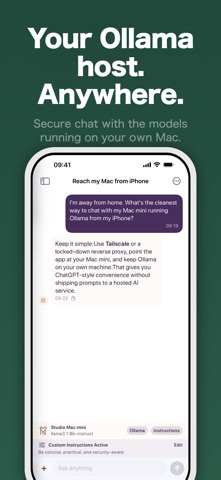
Connect to Ollama running on your Mac, home server, or private endpoint and chat with your own models from iPhone. Your conversations stay on your device — nothing is routed through our servers.

Download Free on the App Store
Ollama Connect app icon

Your models, your hardware, your phone

If you already run Ollama on a Mac or home server, Ollama Connect turns your iPhone into a fast, private front end for it. No cloud LLM subscription, no data leaving your network — just your models, wherever you are.

🖥️

Connect to Your Host

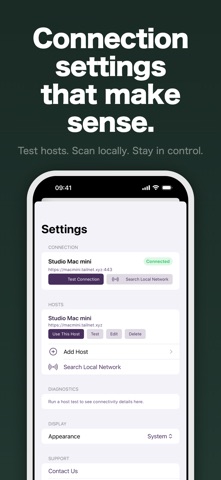
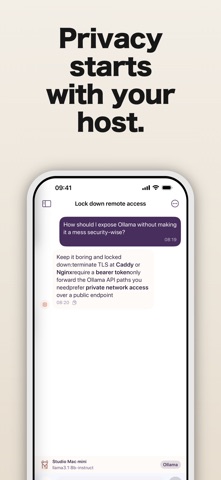
Enter your own Ollama host, or search the local network for nearby servers. Save multiple hosts with connection diagnostics.

Fast Streaming Replies

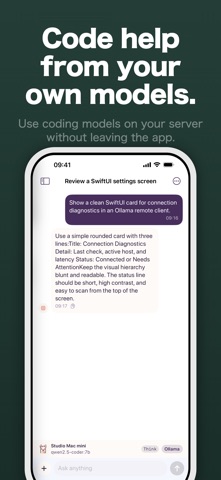
Responses stream in as your model generates them, with Markdown and code-friendly formatting.

🔒

Private by Default

No accounts, no analytics, no tracking. Chats stay on your device unless you send them to your selected host.

🗂️

Local chat history

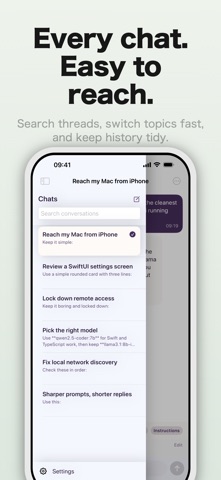
Persistent conversations stored locally on your iPhone, so you can pick up where you left off.

🔄

Per-chat model selection

Choose a different model for each conversation, all backed by your own Ollama server.

📎

Photo & file attachments

Send photos and text files to models that support them — vision and other features depend on model capabilities.

🌐

Multiple saved hosts

Keep your desktop, home server, and remote endpoint side by side, and diagnose connections in a tap.

Built for people who run their own models

Ollama Connect requires your own Ollama-compatible server — it's the client, not the model host. If you already run Ollama, setup is as simple as pointing the app at your host or letting it discover one on your network.

Why chat with your own models?

Running Ollama on your own machine means you decide which models you use, how they're configured, and where your data goes. There's no per-token bill, no rate limit on a bad day, and no third party logging your prompts. The one thing local models have traditionally lacked is a good way to reach them from your phone — and that's exactly the gap Ollama Connect fills.

Leave a capable model loaded on your desktop or home server, then chat with it from the couch, the office, or anywhere you can reach that host. Ollama Connect streams responses as they generate, renders Markdown and code cleanly, and keeps every conversation in local history on your iPhone so you can return to a thread later. Switch models per chat when you want a lighter or heavier model for the task, and attach a photo or text file when your model supports it.

Setup stays out of your way. Point the app at your host directly, or let it scan the local network to discover a running server. Save your desktop, home lab, and remote endpoint side by side, and run connection diagnostics whenever something looks off. No accounts, no analytics, no tracking — just a fast, private front end for the models you already run.

It fits naturally into how developers and enthusiasts already work. Keep a coding-focused model on your workstation and reach it from your phone during a commute; run a larger reasoning model on a home server and query it from another room; or point at a private endpoint you manage yourself. Because the app is purely a client, you're never locked into a particular model or provider — whatever you can serve through Ollama, you can chat with here, and your history stays on your device the whole time.
Frequently asked questions

Do I need my own Ollama server?

Yes. Ollama Connect requires your own Ollama-compatible server. It connects to Ollama on your Mac, home server, or private endpoint — the app is the client, not the model host.

How does it find my Ollama host?

Enter your host directly, or use local network search to find nearby servers. Save multiple hosts and run connection diagnostics to confirm each is reachable.

Is it private?

Yes. No accounts, no analytics, no tracking. Chats and settings stay on your device and are never routed through our servers — they only go to the host you select.

Can I send images or files?

Yes, for supported models. Ollama Connect supports photo and text file attachments, and features such as vision depend on your model's capabilities.

Can I pick a different model per chat?

Yes. Per-chat model selection lets you run different models in different conversations, all backed by your own host.

Is chat history saved?

Yes. Persistent chat history is stored locally on your iPhone, with Markdown and code-friendly formatting for responses.

Take your local LLMs everywhere

Point Ollama Connect at your host and start chatting — private, fast, and free to download.

Download on the App Store

Guides & articles