Cong Le

Lock Your iPhone Screen for Babies & Toddlers

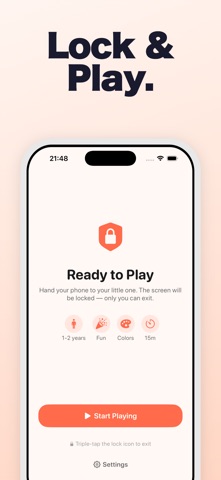
Hand your phone to your little one with confidence. 33 age-appropriate games keep them entertained while a real parent lock stops them calling your boss or deleting your photos.

Download Free on the App Store
Baby Screen Lock app icon

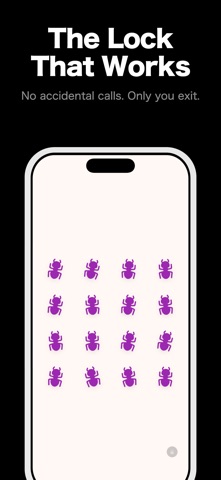
A screen lock that actually works

Built by a parent who was tired of apps that claim to lock the screen but don't. Perfect for restaurants, car rides, waiting rooms, or any time you need a few minutes of peace.

🔒

Parent Lock

The lock hides every exit control. Only you can unlock, with a secret gesture and a math problem toddlers can't solve.

🎮

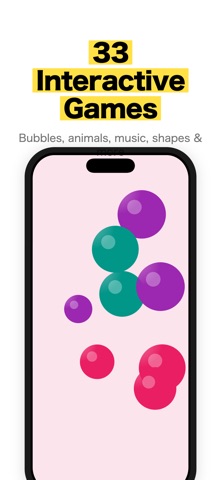
33 Interactive Games

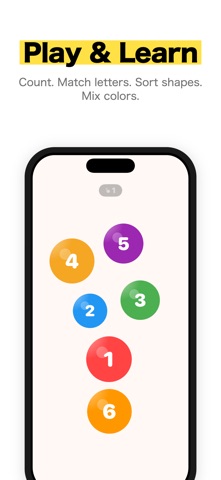
Bouncing animals, floating bubbles, a xylophone, a pretend phone, whack-a-mole, memory match, and a counting number train.

🛜

Private & Offline

No data collection, no tracking, no ads, and no internet required — designed to meet the Kids category and COPPA guidelines.

Content that grows with your child

Every activity adapts to your child's developmental stage. Under 1 sees high-contrast black and white with emerging vivid colors. From 1–2 years, full vivid colors and simple interactions. From 2–3 years, more detail, patterns, and variety. And 3+ gets the full palette including pastels and more complex activities.

Three play modes tune the intensity to the moment: Infant for gentle, quiet play with soft haptics; Medium for balanced everyday engagement; and Fun for lively play with strong feedback.

⏱️

Session Timer

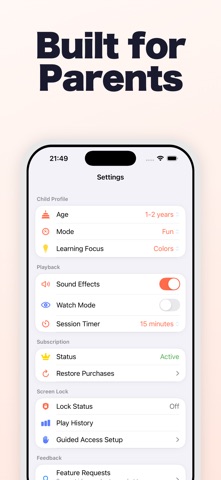
Set a 5–30 minute limit that ends with a gentle wind-down animation instead of an abrupt cut-off.

👀

Watch Mode

Auto-plays games without tapping — perfect for calming down before a nap or at the end of a long day.

📊

Play History

Track session duration, games played, and tap counts so you can see what your child enjoys most.

🛡️

Guided Access Wizard

An in-app setup wizard walks you through blocking hardware buttons for an extra layer of protection.

Made for real parenting moments

Every parent knows the situation: you're at a restaurant, in a waiting room, or halfway through a long car ride, and you need a few calm minutes. You hand over your phone — and a moment later your child has dialled a contact, opened your camera roll, or backed out into an app you never wanted them in. Baby Screen Lock was built by a parent who lived that frustration and was tired of apps that promised a screen lock but didn't deliver one.

Here, the lock genuinely holds. Once you hand the phone over, there is no visible exit — no home indicator to swipe, no menu to escape through. Your child taps, pops, paints, and plays their way through 33 gentle activities, while everything else on your phone stays untouched. When you're ready, a secret gesture and a quick math problem bring you back out, and the optional Guided Access wizard locks down the hardware buttons for the times you want zero surprises.

Just as importantly, it's a calm, private space. No ads interrupt play, nothing tries to upsell your toddler, and no data leaves the device. The content, colours, and intensity all scale to your child's age, so a six-month-old sees soothing high-contrast shapes while a three-year-old gets richer patterns and more to explore. It's screen time you can actually feel good about handing over.
Frequently asked questions

How does the screen lock work?

The parent lock hides all exit controls so a child can't leave the activity. Only you can unlock, using a secret gesture and a math problem. A Guided Access setup wizard can block hardware buttons too.

How many games are included?

33 interactive activities, from tapping bouncing animals and popping bubbles to a xylophone, a pretend phone with a realistic dialer, whack-a-mole, memory match, connect-the-dots, and a counting number train.

Is it suitable for my child's age?

Yes. Content adapts to the developmental stage: high-contrast black and white for under 1, full vivid colors for 1–2 years, more detail for 2–3 years, and the full palette with complex activities for 3+ years.

Can I limit how long my child plays?

Yes. The Session Timer sets a 5–30 minute limit ending in a gentle wind-down animation. Watch Mode auto-plays games without tapping, ideal for calm-down time.

Is it safe and private?

There is no data collection, no tracking, no ads, and no internet required. The app is designed to meet App Store Kids category and COPPA guidelines.

Does it cost anything?

Baby Screen Lock is free to download and offers an auto-renewable subscription that renews unless cancelled at least 24 hours before the period ends. Manage it any time in your Apple ID settings.

A few minutes of peace, safely

Restaurants, car rides, waiting rooms — hand over your phone knowing your child stays in, and everything else stays out.

Download on the App Store

Guides & articles